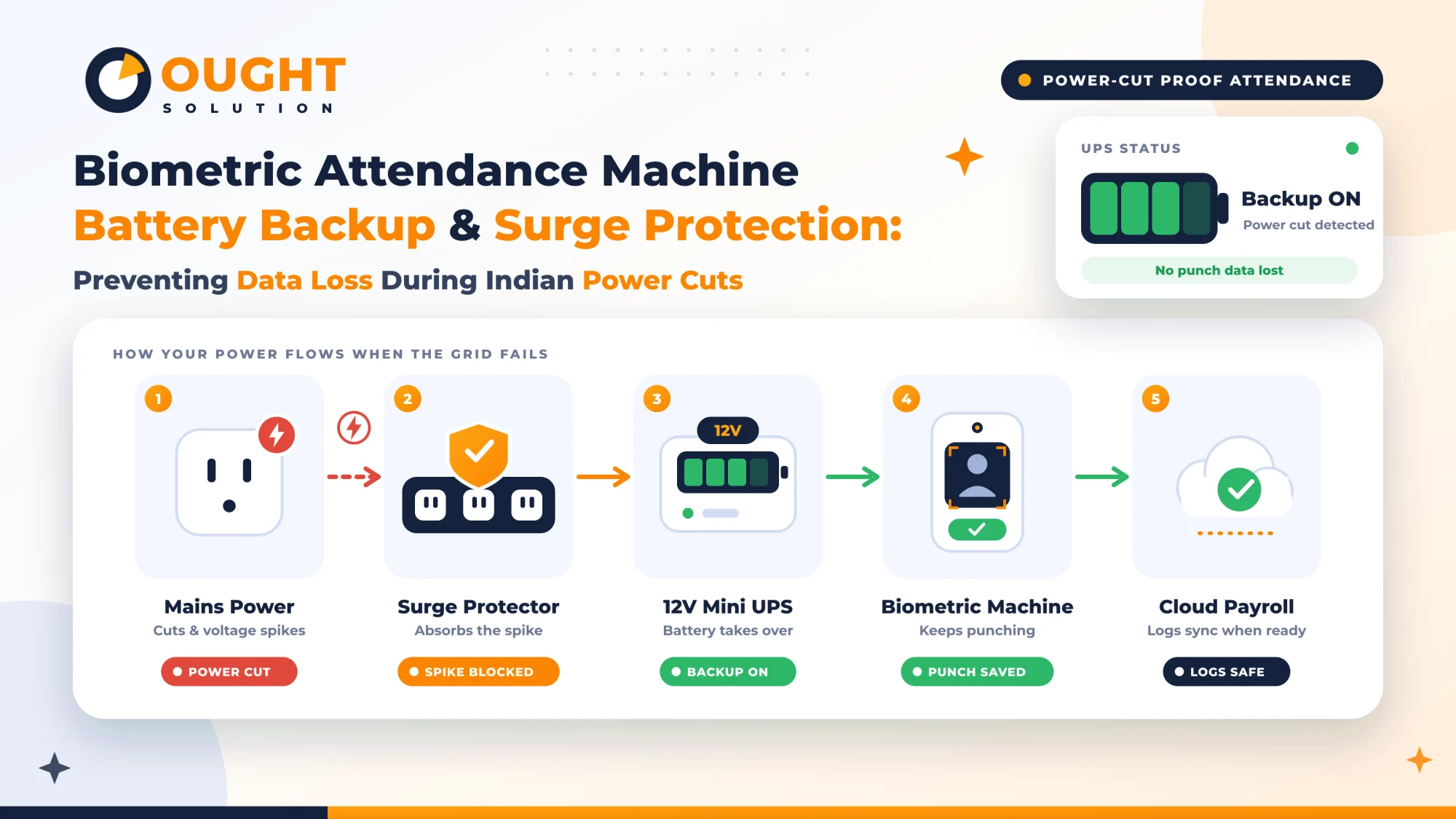
Power reliability in India—especially across industrial zones, Tier-2/Tier-3 cities, and during monsoon months—remains unpredictable. When electricity trips right at a 9:00 AM office rush or a factory shift change, a standard plug-in attendance terminal goes dark instantly. Employees queue up, HR teams scramble to log manual entries, and worse, sudden voltage surges when the grid or diesel generator (DG) kicks back in can permanently damage the device's motherboard.
Investing in a reliable biometric attendance machine with battery backup in India is no longer an optional upgrade; it is basic operational insurance. Understanding how power fluctuations affect biometric hardware—and pairing your devices with the right backup and surge protection—ensures zero downtime and 100% accurate payroll data.
What Happens to a Biometric Machine During Indian Power Fluctuations?
Most businesses assume a power cut only causes temporary inconvenience. In reality, unstable power creates three costly problems for offices and manufacturing units / plants:
Adapter and Motherboard Burnout: Biometric terminals typically run on 12V DC power stepped down from a 230V AC wall socket. When grid power returns or switches over from a DG set, voltage spikes (often exceeding 260V–280V) fry cheap power adapters and travel straight into the main circuit board.
Uncaptured Punches & Payroll Disputes: If a device shuts down mid-shift, employees cannot clock in or out. Manual register fallbacks reintroduce buddy punching, calculation errors, and disputes during month-end salary processing.
Access Control Lockouts: If your biometric device is integrated with an electromagnetic (EM) door lock, a sudden power loss without backup either leaves restricted areas unlocked (fail-safe) or traps personnel inside if emergency release mechanisms aren't properly wired.
Built-in Battery vs. External 12V Mini UPS: Which Backup Do You Need?
Not all battery backups serve the same purpose. Choosing between an internal battery and an external DC UPS depends on whether your device only tracks attendance or also controls physical doors.
| Feature | Built-in Li-ion Battery | External 12V Mini DC UPS |
| Typical Backup Time | 2 to 4 hours | 4 to 8+ hours (capacity dependent) |
| Powers Electromagnetic Locks? | No (Powers terminal only) | Yes (Dedicated 12V/3A–5A output) |
| Best Suited For | Standalone offices, remote sites, small teams | High-traffic offices, manufacturing units / plants, access control doors |
| Replacement & Maintenance | Requires opening the terminal after 18–24 months | Plug-and-play external unit; easy to swap |
| Surge Isolation | Minimal (relies on standard adapter) | Built-in voltage regulation and overcharge protection |
Pro Tip: If your biometric terminal controls a door lock or sits at a busy factory gate where power cuts exceed two hours, never rely solely on the internal battery. Pair the terminal with an external 12V Mini UPS or a centralized 12V/5A SMPS power supply with a 7Ah sealed lead-acid battery.
4 Essential Surge Protection Practices for Indian Workplaces
Battery backup keeps the machine running, but surge protection keeps it alive. Follow these four installation standards to extend your biometric hardware's lifespan from 1–2 years to 5+ years:
Use Regulated SMPS Power Supplies: Avoid low-grade local adapters. Install a surge-protected Switch Mode Power Supply (SMPS) with built-in short-circuit, over-voltage, and overload cutoffs.
Ensure Proper Electrical Earthing: Poor earthing in offices and manufacturing units / plants causes static electricity buildup on optical and capacitive fingerprint sensors. Over time, static shocks degrade sensor accuracy and cause random reboots.
Install a Spike Guard or Line-Interactive UPS: Plug the biometric adapter into a surge-protected socket rather than directly into an unprotected industrial wall line—especially if heavy machinery or air conditioners share the same circuit.
Separate DG Changeover Lines: Generator switchovers create sharp micro-surges. Routing your attendance and network router power through a small UPS smooths out the transition so neither the biometric device nor the Wi-Fi/LAN connection drops.
Preventing Attendance Data Loss: Hardware & Software Safeguards
Even if a power outage lasts for days and a battery drains completely, your historical attendance logs should never vanish. Modern enterprise-grade biometric systems protect data at two levels:
Non-Volatile Flash Memory: Quality biometric terminals store user templates and 50,000 to 200,000+ attendance logs on onboard flash memory. Even if the device loses all power for weeks, the stored punch records remain intact until power is restored.
Real-Time Auto-Push Sync: When paired with 4G/5G SIM connectivity or a UPS-backed Wi-Fi router, devices automatically push every punch in real time to centralized attendance software—such as Ought Solution's Smart Office Software. If the internet drops during an outage, the machine queues logs locally and auto-syncs the moment connectivity returns.
How to Choose the Right Biometric Attendance Machine with Battery Backup in India
Before purchasing a system for your office or manufacturing unit / plant, run through this quick buyer's checklist:
Verify Real Battery Capacity: Check for a minimum 2000mAh internal Li-ion battery for standalone attendance, or confirm 12V DC UPS compatibility for access control setups.
Opt for Multi-Modal Verification: Combine Face Recognition, RFID cards, and Fingerprint scanning (as seen in enterprise models like the OU-BM60W Pro and OU-BM70W Pro) so shift transitions stay fast even on battery power.
Look for Cloud / Push Protocol Support: Ensure the device supports automatic data push to eliminate manual USB pen-drive downloads.
Demand Professional Installation: Proper wiring, earthing checks, and surge-protected power routing during installation prevent 80% of early hardware failures.
Don't let unpredictable power cuts disrupt your payroll or damage your hardware. Ought Solution supplies surge-ready biometric attendance machines with battery backup, 12V Mini UPS accessories, 4G/5G cloud-enabled terminals, and Smart Office Software tailored for Indian offices and manufacturing units / plants. Visit oughtsolution.com today to request a free site assessment and hardware recommendation.

Ought Solution Admin is the technical editorial and solutions architecture desk at Ought Solution, a global B2B IT consulting, custom ERP software, and biometric hardware integration firm. Drawing from hands-on deployments across Manufacturing Units / Plants, healthcare diagnostics, educational campuses, and corporate…